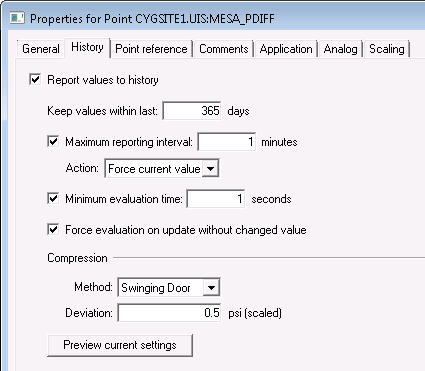
Use the History page to configure history reporting to the VHS, data retention period, reporting and data filtering, and data compression options for a particular point. See History Reporting for more information.
|
|
| Sample History page for an Existing Point |
These are the properties shown on the History page in the PNT Editor.
See Token Categories - Point: History for the corresponding tokens for each property and Filter Attributes - Point: History for the corresponding filter attributes for each property.
| Property | Description | Default Value |
|---|---|---|
|
Report values to history |
Enables reporting of point values to the CygNet Historian (VHS). |
No |
|
Keep values within last n days |
Specifies the time window within which history values are retained in the VHS. Option is 0 to 9999 days. |
30 |
|
Maximum reporting interval |
Specifies the maximum update time interval in minutes. When set for a point, the CVS will always report a new value to the VHS if the time interval represented by the timestamp of the last value reported to the VHS and the timestamp of the new value received by the CVS exceeds the configured maximum reporting time interval. Note: Maximum reporting interval will always default to 1 minute, even if enabled and set to 0. |
1 |
|
Action |
Specifies the action to take if the maximum reporting interval is enabled. The options include:
|
Report next value |
|
Minimum evaluation time |
Specifies the minimum evaluation time interval in seconds. When set for a point, the CVS will not pass a new value to the VHS unless the time interval represented by the timestamp of the last value reported to the VHS and the timestamp of the new value received by the CVS exceeds the configured minimum evaluation time. That is, all value updates with timestamps that are within the minimum time frame are dropped. However, this setting will be ignored and a new value will be sent to the VHS if the status bits have changed from one value update to the next, if the timestamp of the new value received is older than the previously received value or if the Maximum reporting interval is exceeded with the Report next value option set. |
0 |
|
Force evaluation on update without changed value |
Enables the reporting to the VHS of new updates even if the value and status of the new update is the same as the previous update. If this option is not enabled, new values are reported to the VHS only if the value or status has changed. Considerations for Maximum reporting interval, Minimum evaluation time and Compression will be evaluated before applying this setting. |
No |
| Compression | ||
|
Method |
Enables data compression (thinning) to be performed for all real-time values received by the CVS for that point before forwarding to the VHS. Compression applies only to points of Analog point data type. Considerations for Maximum reporting interval and Minimum evaluation time will be evaluated before applying this setting. Additionally, new values will always be sent to the VHS if their status bits have changed from one value update to the next, if the timestamp of the new value received is older than the previously received value or if the value received is non-numeric. Select the desired compression method:
|
Swinging Door |
|
Deviation |
Specifies the range in primary units to be used when compressing historical data.
Note: (scaled) units will be shown only if scaling is enabled for the point. |
0 |
|
Preview current settings |
Click to simulate data reduction using the current settings. You can also experiment with the settings to see how historical data could be reduced by selecting other options. See Previewing Data Compression for more information. |
|
Misconfiguration of the history reporting settings may result in the following errors or warnings. However you can opt to continue with the selected actions without correcting the identified warnings but errors must be fixed. Click Yes or No as appropriate.
The errors are:
The warnings are:

|
|
|

